Hello World. Yesterday, while I was checking my email inbox waiting for a reply, I decided to look on my spam folder that had an interesting and catchy email. It was about some Google Cloud Account that was infected by a malware asking me to click on a button in order to get rid of it avoiding all my data to be deleted. So, I had the idea of sharing how to detect a phishing email and avoid getting exploited by evil dark hats.
Nowadays hackers are becoming skilled in social engineering and designing emails that can shake you leading to a silly move, if you don’t think wisely before acting. Let’s walkthrough the email that I receive and highlight the details that make it an email phishing.
First of all, let’s have a look on the email before opening it. Just the call and the title:

There are some interesting content here that stands out. The title “You Cloud Account©”. This copyright symbol makes it a little bit “official” at a first look. Then you fllow through the content that has an attention emoji and saying that you need to act urgently before all your files vanish, followed by a “Google critical security alert”.
By this time, I knew it was not official because if it was, the title would never be “Your Cloud Account”, they would at least have some official Google logo or Google Cloud without that suspicious logo in the content preview (and it wouldn’t be at the spam box in the first place, so let’s pretend it wasn’t).
For the sake of doing some research I got curious and opened the email. That’s what I got:
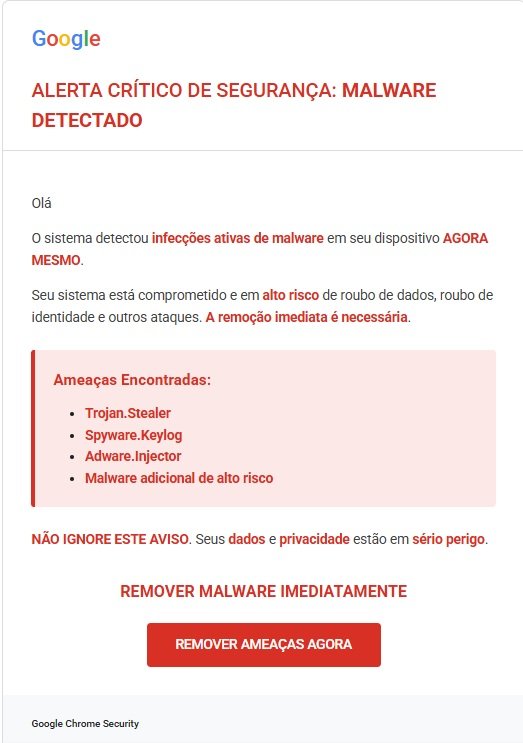
Okay, check out the Google logotype. It can seems to be familiar but as a designer I can tell quickly that this is not the right font.
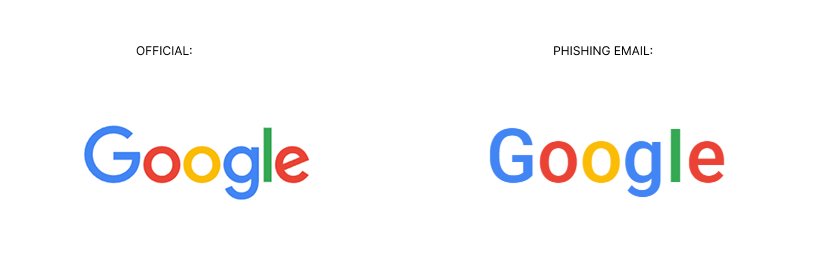
Can you see the difference? Even tho the colors look right there a huge difference on the typography. Always check if the company logo is the official one before believing or accepting anything online.
The sender:
Always check the sender, if it matches with the official url of the company. Typos or different addresses is a red flag. Check out below how a phishing email sender looks like:
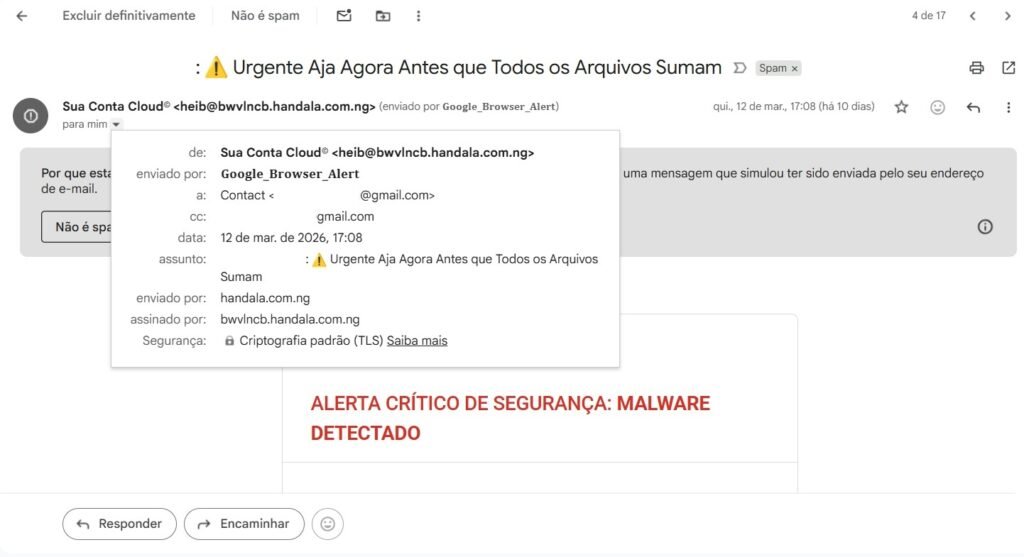
We can see that it was send by a “Google_Browser_Alert” that is far from being an official way of sending. The sender is “heib@bwvlncb.handala.com.ng”, that is clearly a suspicious address coming from Nigeria. It doesn’t necessarily mean that the criminal is from Nigeria, but the .ng after the .com shows that.
Let’s keep the analysis:
Second thing that stood out for me was the urge of urgency given by some words and phrases like:
• Alerta crítico de segurança > Critical security alert
• Alto risco > High risk
• A remoção imediata é necessária > The immediate remove is necessary
• Não ignore este aviso > Don’t ignore this warning
• Sério perigo > Serious danger
Also there is a call-to-action above the button saying:
• Remover malware imediatamente > Remove malware immediately
Followed by the button CTA:
• Remover ameaças agora > Remove threats now
This type of call to emergency/urgency is very common for phishing or evil schemes because they don’t want you to think properly. As more anxious and scared you are, more control they have upon you and your actions, making you act the way they want keeping your mind in the instinct of protection through rash actions.
So, whenever you receive a call, email, text or anything from a person or a company first of all assume it’s not official, until you fill all the gaps making sure that you are having a contact from the real company or person. This is a concept in Security Information called Zero Trust. Which means that nothing is official until it proves to be.
Colors:
Notice the abuse of the color RED they make. This is also intentional to create the dangerous scenario to catch your mind and attention in order to be scared and wanting to solve that problem.
Describing fake malicious with technical words:
Look how they use technical words like:
• Spyware
• Malware
• Trojan
In order for you to have the feeling that this sh*t is real and have file names. Again, creating the scenario where you can identify some common worlds that even layman can relate to bad things in I.T.
The footer
Again they are using the wrong font adding Chrome and Security to strengthen there statement.
Final Thoughts
Remember that everyone can receive this type of emails. It can be on your personal or company’s email. Keep in mind that you shold never believe or click on anything unless you make sure it’s from the official source. ZERO TRUST is mandatory nowadays that hackers are improving every day their methods and even design to get people be phishing emails.
Having that in mind can save you and your company form data breaches, exploitation and cyber threats like real malware, worm, ransomware and others. If you are in your personal environment and really need to check something that you received, first use VirusTotal.com and scan the url or the file, if it seems okay, open it in a VM. If you don’t know about VMs, check out my post here: https://cybearshield.com/installing-kali-linux-on-virtual-machine-with-virtualbox/ showing how you can set a virtual machine as a home lab.
Thanks for reading.