Hi there! João here.
Today, I’m gonna do my best to explain the Transmission Control Protocol (TCP), usually known as TCP/IP network and the OSI model. I’m not a network engineer, but I think I can cover the main points that is involved in this layered base protocol. 시작하자! Let’s get started!
First, a little bit of history. In 1969, the US Department of Defense created the ARPANET in order for computer to send data to each other using packet switching, the same we use nowadays. In the 1970s, the world of networking was very limited in terms of connection because basically only products from the same manufacturer could speak to each other. IBM and other companies developed their own network system accross their devices but when mixing devies from different brands it was not compatible, so trying to connect devices was a nightmare.
With this problem in hand, DARPA (US Defense Advanced Research Projects Agency) asked Vint Cerf and Bob Kahn to build a network that could survive a nuclear strike, meaning that it should be very functinal, lean and interoperable. That’s when TCP/IP came to life and is still there until today as the internet network we know. Turns out that International Organization for Standardization (ISO), in the same period, decided that the world should have some kind of rule or blueprint for all communication. For that, they gathered many organizations and expert individuals to create the OSI (Open Systems Interconnection) Model released in 1984 (Yes, it took a while to finish). Both protocols are based in layers that indicate specific handlings of the transmission through the network. TCP/IP is a 5 layers standard and guidelines of how computers can communicate while OSI model has 7 layers that refers to the same layers but adding two more layers between the Transport and Application Layer, the OSI is actually the one used when checking about data crossing the network. Let’s check it with an image below, it’s better:
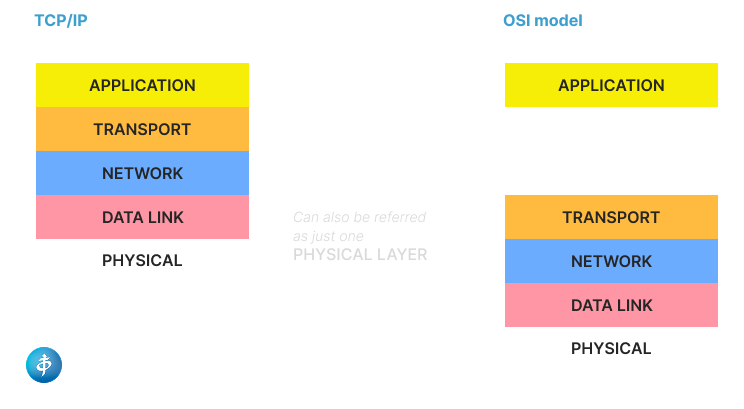
Let’s dive into each of the Layers to understad what is it about:
- Physical Layer: it deals with electrical, radio or optical signals used to move bits. For example: cables, repeaters, hubs, NICs.
- Data Link Layer: it’s responsible to connect one device to another to transfer data using frames. It has two sub-layers:
– LLC (Logical Link Control): Identifies network protocols and provides flow control.
– MAC (Media Access Control): Uses MAC Addresses to decide who has permission to transmit data on the wire.
Devices: Switches and Bridges. - Network Layer: It’s where routing is possible through different networks, like the internet, for example. It uses IP addresses to find the best path to transmit data via packets.
Key Protocols: IPv4, IPv6, ICMP (ping), and IGMP.
Devices: Routers and Layer 3 Switches. - Transport Layer: It ensures that the data arrives in order without losing its message. It can use two different protocols:
– TCP (Transmission Control Protocol): Reliable and “connection-oriented.” It checks if the segment of data arrived; if not, it sends it again.
– UDP (User Datagram Protocol): Fast and “connectionless.” It shoots the data out via datagrams and doesn’t care if it’s received (great for gaming or livestreams). - Session Layer: It’s responsible for coordinating and terminating sessions between applications. Also creating check-points in case of the connection is lost or interrupted, so it can start from where it was for the last time. Examples: NetBIOS, SAP, and RPC.
- Presentation Layer: That’s where Encryption and Compression usually happen to guarantee confidentiality of the message. Examples: SSL/TLS (encryption), JPEG, GIF, MPEG, and ASCII/EBCDIC.
- Application Layer: This is where protocols are used depending on the network services that the user needs from that application. Examples: HTTP/HTTPS (web), SMTP (email), FTP (files), and DNS (mapping names to IPs).
All this process of sending data through the network is related to a concept of Encapsulation. It means that for each layer, as from Layer 7 to Layer 1, it’s like the data (an envelope) is inside a package (capsule) that changes in each layer adding its own “header”.
Encapsulation process
Layers 7-6-5: They get the raw data like a text message an user types. Header: Encryption (TLS), character encoding (ASCII, UTF-8).
Layer 4: it converts the message into small pieces that are segments. Header: TCP or UDP header, including the Port Number like, port 443 for HTTPS or 80 for HTTP.
Layer 3: This is where your message becomes a packet. Header: IP address of the source and destination
Layer 2: Get the packet from the previous Layer and moves it to the Network Interface Card (NIC) as a frame. Header & Trailer: MAC (physical address) header and FCS (Frame Check Sequence) that validates if the data got corrupted during the transit, if so, it send the whole packet away.
Layer 1: The frame turns into bits that are sent via electrical, radio or optical signals wired or through the air.
///After all that encapsulation, we have the decapsulation, which is the reverse process checking layer by layer for the message to get to its right destination.
Alright, that’s it for now. On the next post I’m gonna cover about Wireshark and we are gonna analyse some TCP Layers and data sending. Thank you for the reading.